
A new store, blog, or landing page goes live after weeks of late-night edits. Days pass, and the analytics dashboard still sits near zero, making it hard to tell whether tracking scripts are firing and whether visits register under the right country and channel. Global internet traffic grew by 19% in 2025 according to Cloudflare's 2025 Radar Year in Review, yet a freshly launched domain can sit completely unnoticed inside that massive flow for months.
That frustration is what leads many site owners to look up a booster traffic site. On the surface, the promise looks simple: pay a flat monthly fee and watch daily sessions appear in your reports. Before spending a dollar, though, it's important to separate what a traffic campaign delivers from what an analytics chart makes it look like.
A session count inside Google Analytics 4 (GA4) isn't verified proof of human interest until engagement events and web-server logs agree. When unverified visits flow into a primary analytics view without safeguards, a clean-looking dashboard can distort conversion rates, scramble channel attribution, and make real marketing benchmarks harder to trust. Understanding the limits first helps you decide whether recurring traffic fits a real goal or creates noise you'll spend months untangling.
On this page
What a Booster Traffic Site Actually Sells
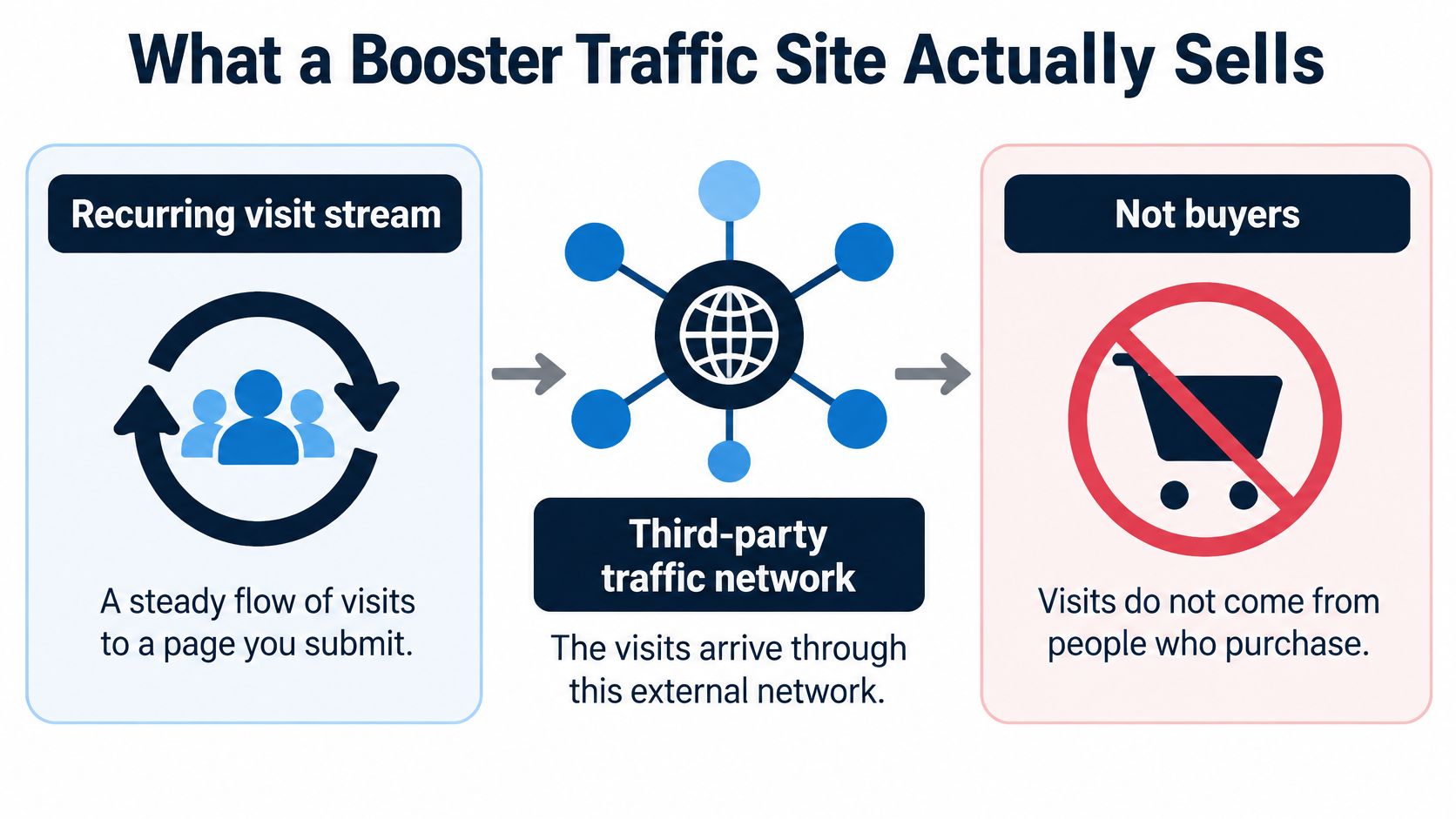
A booster traffic site sells a recurring stream of visits to a specific page you submit, not buyers. Rather than bidding on individual clicks from shoppers, a site owner selects an HTTPS destination page, chooses a target country, enters the keywords visitors should arrive with, and pays a flat monthly fee. Those visits travel through a third-party traffic network and land on the submitted URL every day while the subscription remains active.
Confusion usually starts because marketers use the phrase "buying traffic" for three very different activities. In HubSpot's 2025 Web Strategy Survey of 336 U.S. SEO and marketing professionals, 26% named Google Search as their top traffic driver. Because search visitors carry strong commercial intent, many owners assume any paid service that accepts keyword inputs will behave like search marketing.
The visual below breaks down the core split between paying for recurring visit volume and paying for actual buyers.
Comparing Three Ways to Buy Website Visits
Placing the three common options side by side makes the economic trade-off clear. Each model charges for a different unit and brings a different level of visitor intent.
| Option | What You Pay For | Visitor Intent | Best Use |
|---|---|---|---|
| Pay-per-click ads | Each click on your ad | Higher, because the ad matched a search or interest | Buying attention for an offer that can sell |
| Sponsored placements | Exposure to another site's or newsletter's audience | Medium, tied to how close that audience is to your topic | Reaching a niche readership |
| Traffic campaign | Flat monthly fee for a set number of daily visits | None guaranteed, because visits do not come from buyers | Checking analytics tracking and building early activity |
Pay-per-click ads and sponsored placements work because a real person chooses to click after seeing a headline, product photo, or newsletter recommendation that matches a problem they already have. You're paying for human attention and the chance to earn trust. A recurring traffic campaign works on a completely different premise: it supplies predictable request volume at a fixed cost, without the commercial motivation that drives a purchase.
Paying for volume buys page requests and analytics sessions, never purchasing intent.
That single distinction should guide every budget decision. Decide whether your current bottleneck is a need for raw visit activity on your pages or a need for customers who want your product. Once you answer that question, picking the right channel becomes straightforward.
How Delivery and Country Targeting Work
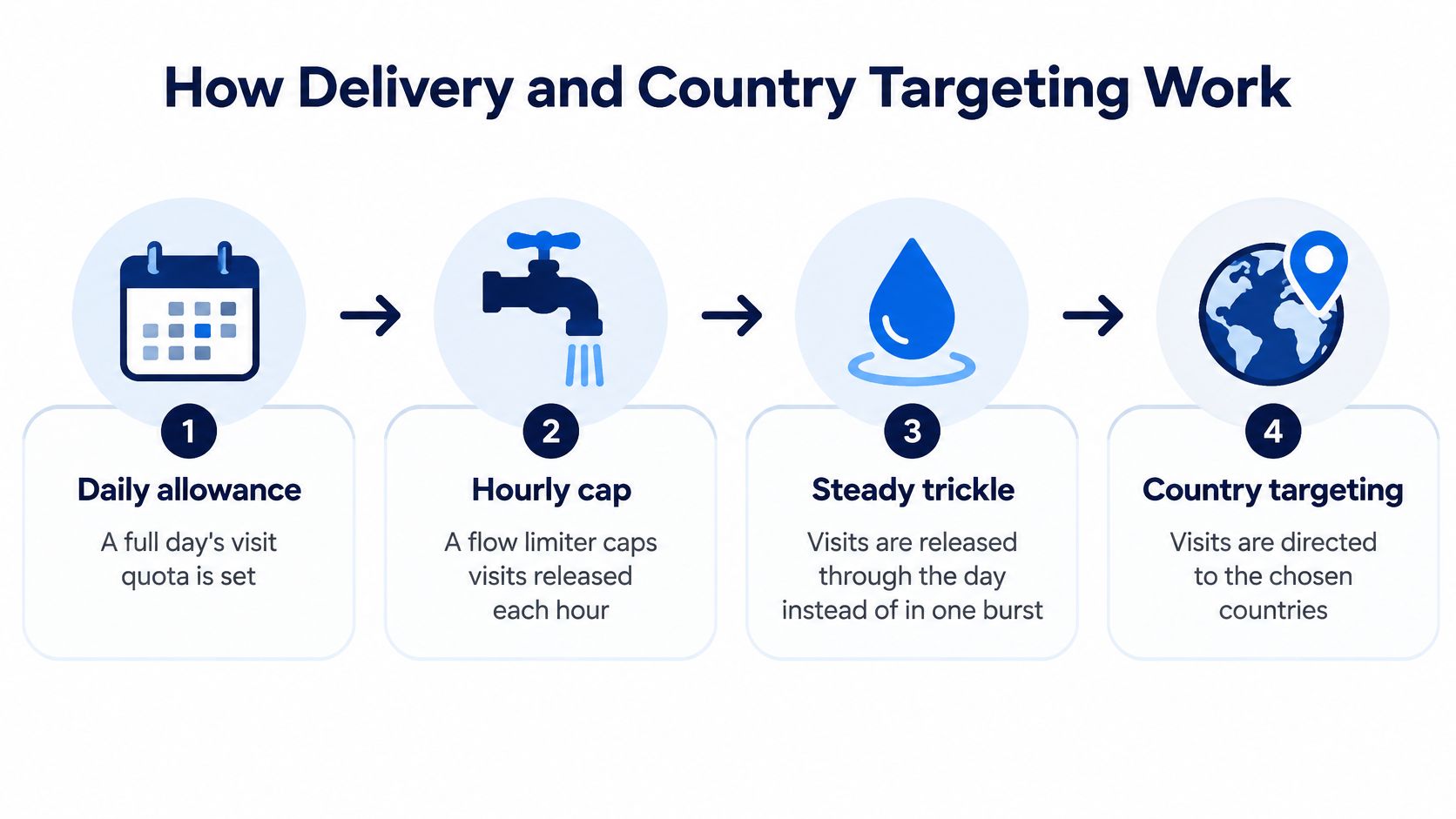
Campaigns generally begin within 12 to 24 hours after checkout, and once running, an hourly limit meters out the daily allowance so visits arrive spread across the day instead of landing in a single burst. The pacing works like a flow limiter on a tap: the supply stays open, yet only so much passes through each hour.
That pacing matters for two reasons. A small web server absorbs steady request volume far more easily than a sudden spike of several thousand hits, and evenly spread visits produce hourly charts you can read. Daily visit figures are always ranges rather than fixed exact counts, because actual throughput follows network availability for the chosen country. Traffic keeps arriving every day for as long as the subscription stays active.
The process diagram below maps how a daily quota moves through hourly pacing into country-level delivery.
How Country Targeting Maps Visits
Country selection happens at checkout, when you choose the market your visitors should come from. Delivery is then restricted to that selection, so picking Canada means the campaign draws visits from Canada. Because the plan prices and visit numbers shown on the page apply to USA traffic, each other country carries its own pricing on the order form.
Three geographic structures are available:
- Single-Country Delivery: Directs visits from one chosen market, such as the United States, United Kingdom, Canada, Germany, France, Italy, Spain, the Netherlands, Japan, South Korea, Singapore, Thailand, Mexico, or Australia.
- Mixed European Region: Delivers visits from a mix of European locations as a single targeting option, for campaigns that want broader regional coverage.
- Worldwide Delivery: Sends visits across multiple global locations when strict national filtering isn't required.
One hard boundary applies here: city, state, and subnational region targeting aren't offered by Noori Stream. No campaign can restrict delivery to a single metro area, province, or postal zone. Site owners evaluating how location filters line up with reporting segments can explore the mechanics of geo-targeted website traffic before locking in a target market.
Why Target Geography Changes What Volume Means
Country selection shapes far more than a cosmetic label inside an analytics map. Online connectivity varies sharply across regions, so identical visit totals sit inside very different digital environments. According to the International Telecommunication Union's 2025 internet use report, roughly 6.0 billion people (74% of the global population) were online in 2025, yet 94% of people in high-income countries use the internet compared with only 23% in low-income countries.
Network density widens that structural gap even further. Data from the International Telecommunication Union's 2025 internet traffic report shows fixed broadband carried roughly 7.3 zettabytes in 2025 against 1.5 zettabytes on mobile broadband, while average monthly mobile broadband traffic per subscription reached 17.9 gigabytes in high-income countries compared with 2.2 gigabytes in low-income countries.
A daily stream directed at a heavily connected country reflects a far denser online market than the same count routed elsewhere. This is why country alignment has to come before any measurement judgment. A session row in an analytics report is only a counted request until engagement signals and server-side data agree with it, and that comparison only means something when the traffic was pointed at the right market in the first place. If your audience is German small businesses, a worldwide campaign can fill every chart while telling you nothing about how that audience experiences your pages.
What a Visit Can and Cannot Buy
Say an online shop owner sets up a new product catalog, subscribes to a traffic campaign, and watches several thousand sessions roll into analytics over two weeks. Every chart trends upward, yet the order queue stays completely empty. The owner checks the payment gateway, tests the cart button, and wonders what broke.
Nothing broke on the checkout page. Purchased visits don't originate from shoppers actively hunting for a product, so the service doesn't guarantee sales, sign-ups, leads, ad clicks, or any other visitor action. If a visitor happens to subscribe to a newsletter or complete a purchase, treat it as an unexpected bonus rather than an outcome you paid to produce.
Search Labels and Policy Boundaries
Another common trap involves keyword targeting and channel labels. Even when you enter specific phrases during setup and those visits appear under Organic Search in analytics, that label doesn't mean your site climbed in Google Search rankings, that real searchers typed your query, or that the setup carries zero compliance risk.
Search engines and advertising measurement bodies draw strict lines around artificial activity. Google Search Central's spam policies explicitly classify machine-generated traffic intended to manipulate Search as a spam-policy issue. On the measurement side, the Media Rating Council (MRC) separates ordinary invalid traffic from advanced invalid traffic that requires multi-signal analysis and human review, while advising teams to segment purchased traffic at the campaign level and document detection steps. The Interactive Advertising Bureau (IAB) similarly defines invalid traffic as activity generated by bots or nonhuman sources, or events that fail to represent a legitimate measurement opportunity.
Operational boundary: Use campaign traffic to check that your analytics records visits correctly, never as proof of SEO performance or genuine market demand.
What Purchased Visits Can Realistically Deliver
Stripping away sales and ranking myths leaves a smaller, clearer set of practical uses that don't mislead stakeholders:
- Pre-Spend Page Checks: Confirming that a freshly built landing page or storefront records visits correctly before committing larger budgets to paid search or social campaigns.
- Early Analytics Activity: Populating a quiet dashboard so an owner can verify tracking tags fire, multi-page navigation registers, and geographic segments show up as configured.
- Steady Flow During Long Ramp-Ups: Maintaining ongoing daily requests across an HTTPS page while organic content, partnerships, and email lists take months to build real readership.
Because these visits serve an observational role, keep them operationally isolated from marketing performance reports. Label every campaign clearly, exclude those dates from customer-acquisition and conversion-rate benchmarks, and disclose the traffic source whenever sharing analytics slides with partners or investors.
Checking Whether Visits Are Real in GA4
Seeing sessions appear inside GA4 feels reassuring, yet the numbers across a campaign dashboard, web-server logs, and an analytics property rarely match. Each layer filters requests differently. In Google Analytics Help's guidance on known bot traffic, Google notes that GA4 automatically excludes known bots and spiders using Google research and the IAB International Spiders and Bots List, but property owners can't disable that filter or inspect how many visits were removed.
Client-side factors widen the gap even more. Analytics platforms count visits differently from raw campaign totals because of ad blockers, cookie consent banners, tracking code placement, and normal reporting delays. A discrepancy between delivered visits and recorded sessions is expected behavior, not automatically a broken tag.
Clean-looking reports can hide data pollution. As noted in Lunio's Global Invalid Traffic Report 2026, invalid traffic includes events that don't come from a genuine user with real intent, and GA4 filtering isn't fully retroactive. Once unverified sessions mix into your primary property, filters can't go back and scrub historical averages for conversion rate, attribution, or remarketing lists.
Step-by-Step Verification Order
Judging visit quality requires checking multiple layers in sequence instead of trusting a single headline metric:
- Match GA4 sessions against web-server requests. Pull server access logs for the same date range and compare raw HTTP hits against tracked sessions to see how much activity gets dropped before JavaScript ever executes.
- Audit engagement time and event sequences. Inspect whether sessions trigger real interaction events such as scrolling, menu clicks, or multi-page transitions instead of opening a single URL and disconnecting immediately.
- Segment by source, country, device, and network. Break down session clusters by geography, browser version, and, where privacy laws permit, IP block or autonomous system number (ASN) to check whether activity concentrates inside a narrow slice of hosting infrastructure.
For practical navigation through the reporting screens before running these checks, walk through how to see your traffic in Google Analytics so you know which views display real-time and acquisition breakdowns.
Signals and Blind Spots Inside GA4
Every individual metric in an analytics dashboard has a blind spot. Pairing signals together keeps you from drawing quick, faulty conclusions.
| Signal | What It Suggests | Main Weakness |
|---|---|---|
| GA4 sessions compared with server requests | Whether counts line up or diverge | Filtering happens at different layers, so gaps are expected |
| Engagement time and event sequence | Real interaction with page elements | Only meaningful if events are set up correctly |
| Hourly and browser patterns | Regular timing or identical browsers hint at automation | Sophisticated traffic can mimic patterns, so one check is not enough |
| Repeat visits | Visitors come back to the site | Campaign visitors may not return, so absence alone proves little |
| Conversions and revenue against a control period | Whether campaign days change business results | Most campaign visitors will not convert, so compare with a control period |
Reading Anomaly Markers and Holdout Baselines
Certain patterns deserve closer scrutiny right away: repeated sub-second sessions, rigid hourly intervals that never fluctuate, identical browser user-agent strings, and heavy concentration on data-center networks. Even then, one anomaly rarely settles the question on its own. Modern scripts can randomize dwell times, while legitimate corporate offices can send dozens of employees through identical browser builds and shared gateways.
The most reliable safeguard is a holdout comparison. Record a clean control period with no active campaign (or leave an equivalent page out of the test), then compare engagement rates, assisted conversions, and revenue per session against campaign days. When session totals double while orders and leads stay flat, the extra visits are inflating your denominator and making genuine channels look weaker than they are.
Using Booster Traffic to Check Your Analytics Setup
Where steady visits genuinely help is on the measurement side. A brand-new GA4 property can sit empty for weeks, so problems such as a missing tag on one page template, a consent banner that blocks every session, or a key event that fires on the wrong page stay hidden until real customers arrive. A daily stream from one country gives those reports something to show within a day of the campaign starting.
Keep the scope narrow. Because the visits come through a third-party traffic network, they show whether your analytics records visits correctly, not how customers would react to your pages.
Following Visits Past the Landing Page
When low bounce rate settings are active, each visit opens a second page on your site instead of leaving after the first one. That gives you a simple way to confirm tracking beyond the page you submitted: if the landing page records views in GA4 but the pages visitors move on to don't, the tag is missing from part of your site.
| Check | Where to Look in GA4 | What It Confirms |
|---|---|---|
| Landing page tracking | Realtime report, views by page title | The tag loads on the page you submitted |
| Country | Realtime report, or Demographic details by country | Visits come from the country you chose |
| Channel label | Traffic acquisition report, by channel group | Visits are recorded under Organic Search |
| Second-page tracking | Pages and screens report | The pages visitors move on to also record views |
| Key events | Key events report | No conversion fires just because a page loaded |
That last row matters more than it looks. If a key event is set to fire whenever a page loads, such as a pricing or thank-you page view, campaign visits that reach that page will count as conversions. Tie key events to actions like form submissions or purchases before the campaign starts, so the numbers you care about stay clean.
Steady visits test your measurement, not your market.
Once these checks pass, you can trust that the visits your property records from search, ads and email are being counted correctly too.
Checklist Before You Start a Traffic Test
A traffic test works like a fire drill for your analytics: the value depends on knowing exactly what you are practicing before the alarm sounds. Teams that skip preparation end up with charts full of visits they cannot interpret and benchmarks they can no longer trust.
Nine Pre-Launch Checks in Order
- Write the exact question the test answers. A question like "do visits from Canada show up in GA4 under the right country?" gives the campaign a deliverable. A vague goal like "see what happens" gives you noise.
- Confirm your destination page meets the provider's content rules. Excluded URLs typically include video platforms, freelance marketplaces, advertising shorteners, and adult, violent, or illegal content. If the traffic network rejects your page, the monthly payment is refunded in full and the subscription is cancelled, but checking eligibility first still saves you a lost week.
- Ask yourself which market your analytics should reflect, then choose that target country. The wrong geography skews regional reporting views, and daily visit numbers are ranges that depend on network availability for the country you pick.
- Apply the measurement hygiene from the analytics step above before launch, not after. Date labels and benchmark exclusions only protect your data if they exist before the first visit arrives.
- Set a control period and save those baseline numbers. Pre-test engagement and conversion averages are your honest comparison point once daily visits begin, the same way a scale needs a zero reading before it can weigh anything.
- Verify delivery inside GA4 Realtime and the Traffic acquisition report. Realtime shows active users on the site within recent minutes along with their pages, while Traffic acquisition confirms where sessions come from. Because visits arrive as organic search traffic for your chosen keywords, expect them under Organic Search rather than as referrals or direct hits.
- Treat a GA4 session as unconfirmed until engagement and server data agree. Analytics tools can count visits differently from the exact campaign count because of ad blockers, cookie consent settings, tracking code placement, and reporting delays. A clean-looking report can make benchmarks, attribution, and conversion rates less reliable, so cross-check before you draw conclusions.
- One warning about Google Search Console: visibility there is not guaranteed. According to Google Search Console Help, Search Console tracks impressions and clicks specifically from Google Search, News, and Discover rather than every visit logged by an analytics tool, so GA4 remains the right place to verify your campaign.
- Stop the campaign as soon as the test ends. Turning off renewal keeps traffic running until the end of the paid month, though that month is not refunded, so time your decision around the billing cycle and avoid paying for unmonitored visits with no question behind them.
Deciding Whether a Traffic Campaign Fits Your Goal
A marketing lead opens GA4 on Monday and sees sessions from one country climb in a smooth line. The chart looks orderly. It only helps if the team already knows what those visits are supposed to answer.
Pay for recurring visits when the goal is steady daily visits from one country, checking that your analytics tracking works, or building early activity on a new site. Direct sales, qualified leads, email sign-ups, and higher search rankings belong on channels that reach people with real intent, such as search ads, niche sponsorships, or helpful content. The service does not guarantee sales, sign-ups, leads, ad clicks, or any other visitor action.
A session count works like a turnstile at a shop door. It shows that someone passed through. It does not show intent. Treat GA4 sessions as unverified until engagement and server data agree. A clean-looking report can make benchmarks, attribution, and conversion rates less reliable when test sessions stay mixed into commercial formulas.
When steady daily visits from one country or an analytics check fit the roadmap, Noori Stream sells monthly website traffic plans that target specific countries and keywords. The USA prices and visit ranges are below. Other countries have their own prices on the order form.
| Plan | Monthly Price | Daily Visits | Monthly Visits |
|---|---|---|---|
| Silver | $10 | 200-400 | approx. 7,500 |
| Gold | $20 | 400-600 | approx. 15,000 |
| Diamond | $40 | approx. 1,500 | approx. 45,000 |
Daily visit numbers are ranges and depend on network availability for the target country. Visits arrive every day for as long as the customer stays subscribed, spread through the day with an hourly limit rather than arriving in one burst. Traffic is delivered through a third-party traffic network and arrives as organic search traffic for the chosen keywords, so Google Analytics counts those visits under Organic Search.
Order Flow, Billing and Refund Rules
To order, the customer chooses a plan and the country to receive visitors from, then enters the HTTPS page to promote and the keywords visitors should arrive with. Low bounce rate settings make campaigns browse more than one page on the site instead of single-page visits. Review what is a good bounce rate so multi-page test activity is not read as commercial demand.
Once the campaign starts, results can be checked in Google Analytics 4 in the Realtime and Traffic acquisition reports, which show visits, countries, and sources. Analytics tools can count visits differently from the exact campaign count because of ad blockers, cookie consent settings, tracking code placement, and reporting delays. Match those reports against server logs before you treat the session total as settled.
If the page is rejected by the traffic network or the campaign cannot start, the monthly payment is refunded in full and the subscription is cancelled. Customers can keep traffic running until the end of a paid month by turning off renewal, but that month is then not refunded.
Write down the question the test must answer before you pay. If the next milestone needs recurring daily visits from one country, or a way to confirm a fresh GA4 setup works, Noori Stream offers flat monthly traffic plans with stated allowances. Confirm country pricing on the order form, and verify the campaign in GA4 so the test data stays useful.
Ready to start a campaign?
Country and keyword targeting, visits within 12-24 hours, from $10/month.